Перетворюємо списки на діалоги
Маю подарунок для редакторів.

Кажуть, що деякі автори часто присилають текст, де діалог зроблено маркованим списком. Перетворити такий список у нормальний текст і розставити тире — та ще морока. Але я маю рішення — макрос для візуал бейсіка у ворді. Ну, і заразом чистимо пробіли та наводимо лад із рисками та тире.
Оновлено 08/10/206:
- Нормальне форматування для негативних діапазонів дат
(-100 - -90 → −100 — −90) - Деякі виправлення та покращення
- Відкрийте документ з маркованими списками з діалогами у Microsoft Word.
-
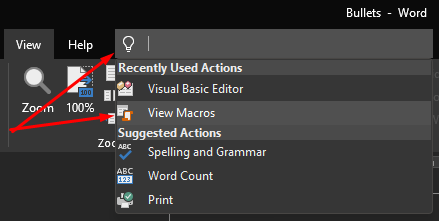
Відкрийте Visual Basic Editor. «Alt» + «F11» або так:
-
У Visual Basic Editor виберіть Normal у списку проектів (Project) в лівій
частині екрана.
-
Вставте код у вікно коду макросу:
Option Explicit Sub ConvertDialogListsToText(dashesArray As Variant) Dim para As Paragraph Dim i As Long ' Loop through each paragraph in reverse order For i = ActiveDocument.Paragraphs.Count To 1 Step -1 Set para = ActiveDocument.Paragraphs(i) ' Check if the paragraph is a bullet or outline list item ' and if its list marker is one of the supported dash characters If (para.Range.ListFormat.ListType = wdListBullet Or _ para.Range.ListFormat.ListType = wdListOutlineNumbering) _ And (InStr(1, Join(dashesArray, ""), _ para.Range.ListFormat.ListString) > 0) Then ' Remove the list formatting para.Range.ListFormat.RemoveNumbers ' Insert an em dash followed by a regular space para.Range.Text = ChrW(8212) & " " & para.Range.Text End If Next i End Sub Sub MergeSpaces() Application.ScreenUpdating = False With ActiveDocument.Range With .Find .ClearFormatting .Replacement.ClearFormatting ' Replace multiple regular spaces with a single space .Text = "([^s ])@[^s ]" .Replacement.Text = " " .Forward = True .Format = False .Wrap = wdFindContinue .MatchWildcards = True .Execute Replace:=wdReplaceAll End With End With Application.ScreenUpdating = True End Sub Sub NormalizeNumericMinusSigns(dashesArray As Variant) Dim dash As Variant Dim rng As Range Dim prevChar As String Dim nextChar As String ' Convert dash-like characters used as numeric minus signs ' to the mathematical minus sign U+2212. ' Examples: ' -100 -> −100 ' (-25) -> (−25) ' -100 - -90 -> −100 - −90 ' A dash is treated as a minus sign only when: ' 1. It is immediately followed by a digit. ' 2. It is at the beginning of the document or is not ' immediately preceded by a letter or digit. ' This prevents values such as 2026-10-08 or A-10 ' from being interpreted as negative numbers. For Each dash In dashesArray ' Skip the mathematical minus itself If CStr(dash) <> ChrW(8722) Then Set rng = ActiveDocument.Content With rng.Find .ClearFormatting .Replacement.ClearFormatting .Text = CStr(dash) .Forward = True .Wrap = wdFindStop .Format = False .MatchCase = False .MatchWholeWord = False .MatchWildcards = False End With Do While rng.Find.Execute prevChar = "" nextChar = "" ' Get the character before the dash If rng.Start > 0 Then prevChar = ActiveDocument.Range( _ rng.Start - 1, rng.Start).Text End If ' Get the character after the dash If rng.End < ActiveDocument.Content.End Then nextChar = ActiveDocument.Range( _ rng.End, rng.End + 1).Text End If ' Convert to a mathematical minus when the dash ' is followed by a digit and appears in unary context If IsDigit(nextChar) And _ IsUnaryMinusContext(prevChar) Then rng.Text = ChrW(8722) End If rng.Collapse wdCollapseEnd Loop End If Next dash End Sub Sub ReplaceDashes(dashesArray As Variant) Dim dash As Variant Dim rng As Range Dim nextChar As String For Each dash In dashesArray ' Do not process the mathematical minus sign as a dash If CStr(dash) <> ChrW(8722) Then ' ----------------------------------------------------- ' Replace "space + dash" with ' "non-breaking space + em dash". ' Example: ' 100 - 200 ' becomes: ' 100 — 200 ' The space before the em dash is U+00A0. ' ----------------------------------------------------- Set rng = ActiveDocument.Content With rng.Find .ClearFormatting .Replacement.ClearFormatting .Text = " " & CStr(dash) .Forward = True .Wrap = wdFindStop .Format = False .MatchCase = False .MatchWholeWord = False .MatchWildcards = False End With Do While rng.Find.Execute nextChar = "" If rng.End < ActiveDocument.Content.End Then nextChar = ActiveDocument.Range( _ rng.End, rng.End + 1).Text End If ' A dash directly followed by a digit may still be ' a numeric minus sign, so leave it untouched here. If Not IsDigit(nextChar) Then rng.Text = ChrW(160) & ChrW(8212) End If rng.Collapse wdCollapseEnd Loop ' ----------------------------------------------------- ' Replace "dash + space" with "em dash + space". ' The space after the em dash remains a regular space. ' ----------------------------------------------------- Set rng = ActiveDocument.Content With rng.Find .ClearFormatting .Replacement.ClearFormatting .Text = CStr(dash) & " " .Replacement.Text = ChrW(8212) & " " .Forward = True .Wrap = wdFindStop .Format = False .MatchCase = False .MatchWholeWord = False .MatchWildcards = False .Execute Replace:=wdReplaceAll End With End If Next dash End Sub Private Function IsDigit(ByVal value As String) As Boolean ' Return True if the supplied character is a decimal digit If Len(value) = 1 Then IsDigit = (value >= "0" And value <= "9") Else IsDigit = False End If End Function Private Function IsUnaryMinusContext(ByVal value As String) As Boolean ' The beginning of the document is a valid unary minus context If Len(value) = 0 Then IsUnaryMinusContext = True Exit Function End If ' A minus sign following a letter or digit is normally part ' of another construction, such as 2026-10 or A-10 If IsLetterOrDigit(value) Then IsUnaryMinusContext = False Else IsUnaryMinusContext = True End If End Function Private Function IsLetterOrDigit(ByVal value As String) As Boolean Dim code As Long If Len(value) <> 1 Then IsLetterOrDigit = False Exit Function End If code = AscW(value) ' Digits 0-9 If code >= 48 And code <= 57 Then IsLetterOrDigit = True Exit Function End If ' Latin uppercase letters If code >= 65 And code <= 90 Then IsLetterOrDigit = True Exit Function End If ' Latin lowercase letters If code >= 97 And code <= 122 Then IsLetterOrDigit = True Exit Function End If ' Basic Cyrillic uppercase and lowercase letters If code >= &H410 And code <= &H44F Then IsLetterOrDigit = True Exit Function End If ' Ukrainian Cyrillic letters: ' І, і, Ї, ї, Є, є, Ґ, ґ Select Case code Case &H406, &H456, _ &H407, &H457, _ &H404, &H454, _ &H490, &H491 IsLetterOrDigit = True Exit Function End Select IsLetterOrDigit = False End Function Sub RightTrim() With ActiveDocument.Content.Find .ClearFormatting .Replacement.ClearFormatting ' Remove regular spaces immediately before paragraph marks .Text = " ^p" .Replacement.Text = "^p" .Forward = True .Wrap = wdFindStop .Format = False .MatchCase = False .MatchWholeWord = False .MatchWildcards = False .MatchSoundsLike = False .MatchAllWordForms = False .Execute Replace:=wdReplaceAll End With End Sub Sub LeftTrim() With ActiveDocument.Content.Find .ClearFormatting .Replacement.ClearFormatting ' Remove regular spaces immediately after paragraph marks .Text = "^p " .Replacement.Text = "^p" .Forward = True .Wrap = wdFindStop .Format = False .MatchCase = False .MatchWholeWord = False .MatchWildcards = False .MatchSoundsLike = False .MatchAllWordForms = False .Execute Replace:=wdReplaceAll End With End Sub Sub RemoveFirstSpace() Dim firstChar As Range Set firstChar = ActiveDocument.Range.Characters(1) ' Remove a leading regular space at the beginning of the document If firstChar.Text = " " Then firstChar.Delete End If End Sub Sub ClearDoc() Dim dashesArray As Variant ' Supported dash, hyphen and minus-like characters: ' 45 = Hyphen-minus ' 8212 = Em dash ' 8211 = En dash ' 8209 = Non-breaking hyphen ' 8722 = Mathematical minus sign ' 8210 = Figure dash ' 8259 = Hyphen bullet dashesArray = Array( _ ChrW(45), _ ChrW(8212), _ ChrW(8211), _ ChrW(8209), _ ChrW(8722), _ ChrW(8210), _ ChrW(8259) _ ) Call ConvertDialogListsToText(dashesArray) Call MergeSpaces Call RightTrim Call LeftTrim ' Convert numeric minus signs before processing punctuation dashes Call NormalizeNumericMinusSigns(dashesArray) ' Normalize punctuation dashes Call ReplaceDashes(dashesArray) Call RemoveFirstSpace End Sub - Збережіть макрос.
-
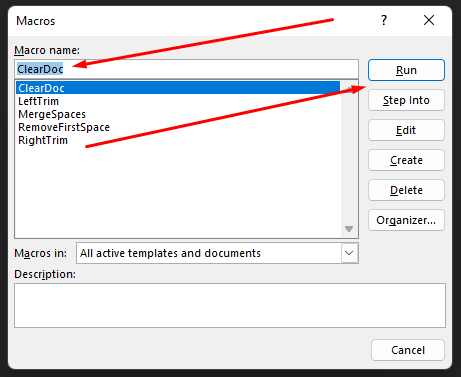
Відкрийте «Макроси» (Macros). «Alt» + «F8» або так:
-
Виберіть новий макрос ClearDoc і натисніть Run щоб запустити його.
- Перевірте документ і закиньте донат на ЗСУ.


Користуюючись нагодою, хочу звернути увагу на розкладку з тире, наголосом і
ла́пками:
розкладка
Мітки: tools
posted by IamYurkas at 20:48
2 comments



/pic4216059.png)
/pic2398773.jpg)

/pic3010365.jpg)


